
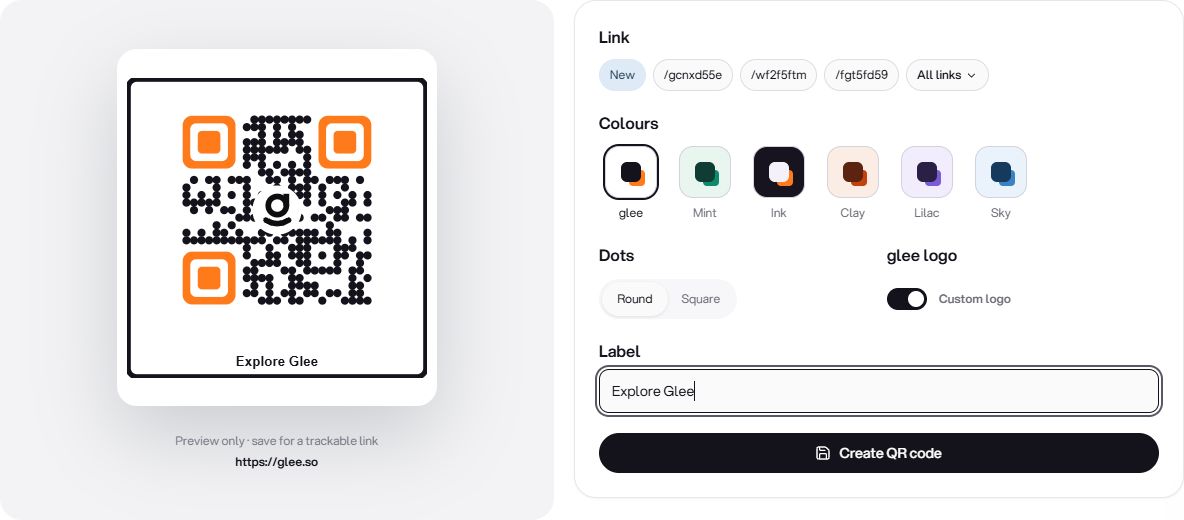
Custom QR codes with colours, logos and downloads
TTushar Kumar Shaha27 Sep 2026
QR codes have their own home in Glee. Create a code for a supported destination, customise its appearance and keep it in the QR library for the next time you need it.
Make the code fit the material
The QR designer brings the destination and visual controls together with a live preview. Use the available colour, style and logo settings to match the code to a business card, poster, packaging or event handout.
•
Review before downloading. Check the code's appearance and destination while you design it.
•
Export for sharing. Download a supported image format for your digital or print layout.
•
Find it again. Search and manage saved codes from a library separate from your short links.
Appearance still needs to scan
Keep enough contrast and space around the code, and scan-test the exported result at the size you plan to use. Supported tracked destinations can be reviewed in Analytics; a QR image on its own is not proof that someone completed the action after scanning.
Get updates like this by email
One email when something ships. Nothing in between.