
Inbox Feature Updates
TTushar Kumar Shaha9 Apr 2025
New Features
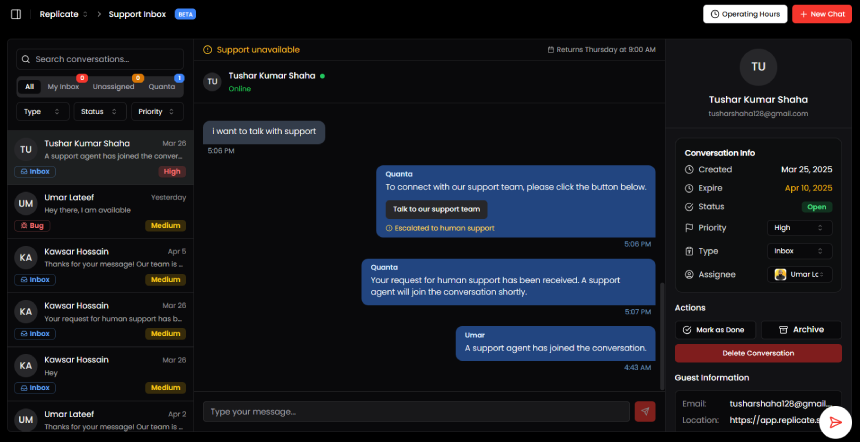
New Message Count Indicators
•
Added real-time counters for:
•
Inbox
•
Unassigned
•
Quanta (AI chat conversations)
Quanta AI Chat Tab
•
New dedicated tab to view and manage all AI-powered customer conversations separately from support chats.
Enhanced Conversation Management
•
Delete Option: Permanently remove conversations from the inbox.
•
Expiration Date: Displays when each AI chat will automatically expire.
Performance Optimization
•
Infinite Scroll: Messages now load dynamically as users scroll, improving performance for large datasets.
AI-to-Human Transition
•
Rollback Feature: Transfer conversations from Quanta (AI) back to human support agents when needed.
Improvements
•
Redesigned tab layout for clearer navigation.
•
Added confirmation prompts for delete to prevent accidental use.
•
Optimized chat list loading for better responsiveness.
Important Notes
•
The Quanta tab requires AI features to be enabled in your settings.
•
Expired chats will be automatically deleted from database.
•
Rolling back a chat notifies the assigned support agent.
Get updates like this by email
One email when something ships. Nothing in between.