
MCP v1.1.3 – Local Repository Intelligence & Context-Aware AI Tools
TTushar Kumar Shaha15 Jun 2026
We’ve released @rectify-so/mcp v1.1.3, bringing powerful local repository intelligence, memory, and operational analysis tools to any MCP-compatible IDE or CLI.
Users can now connect Rectify MCP to tools like Claude Code, Cursor, VS Code (Copilot), Windsurf, Codex CLI, and Gemini CLI, giving their AI assistant deep visibility into both local codebases and Rectify cloud data.
New Feature: Local Repository Intelligence
The biggest addition in v1.1.3 is a local-first code intelligence system that runs entirely on your machine. Your repository graph, symbols, and relationships never leave your device.
Repository Intelligence Tools (No Token Required)
•
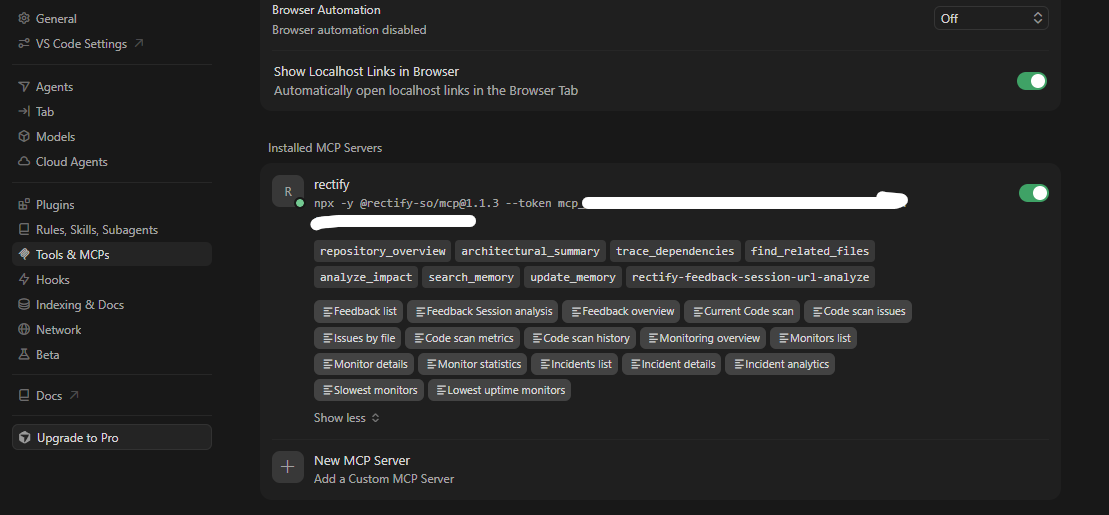
Update Memory — Index the repository into persistent local memory. Incrementally re-parses only changed files, so after the first run, updates are extremely fast.
•
Repository Overview — Get insights into project structure, file counts, languages, largest modules, and most-connected files.
•
Architectural Summary — Generate a high-level architecture view showing subsystem boundaries and cross-module dependencies.
•
Trace Dependencies — Analyze inbound and outbound relationships between files and symbols across imports, calls, and inheritance.
•
Find Related Files — Discover files most closely connected to a target file or feature.
•
Analyze Impact — Evaluate the blast radius of a change by identifying files, modules, and tests that transitively depend on a symbol.
•
Search Memory — Full-text search across indexed symbols, functions, classes, and file paths with ranked results.
These tools work completely offline and do not require a Rectify token.
Feedback Intelligence (Requires Token)
Session Analysis Tool
•
Feedback Session URL Analysis — Analyze session recordings linked to bug reports, including network errors, performance issues, console logs, and user actions.
Structured Resource Support
MCP now exposes structured resources so AI assistants can directly access Rectify project data. All resources below require a valid Rectify token.
Feedback Resources
•
Feedback List — Search and retrieve user feedback with filters by status, priority, and type.
•
Feedback Overview — Statistical summary of feedback counts by status, type, and priority.
•
Feedback Session Analysis — Access decompressed session data for bug reports with recordings.
Code Scan Resources
•
Current Code Scan — Latest scan job status, branch, commit, and overall results.
•
Code Scan Issues — Detected issues filterable by severity, type, and status.
•
Issues by File — Problems grouped by file path.
•
Code Scan Metrics — Coverage, duplications, technical debt, and quality gate status.
•
Code Scan History — Historical scan timeline and quality trends.
Monitoring Resources
•
Monitoring Overview — Overall system health, active incidents, and aggregate uptime.
•
Monitors List — All configured monitors with current status and response metrics.
•
Monitor Details — Configuration and last-check results for a specific monitor.
•
Monitor Statistics — Uptime percentage and response-time history.
•
Slowest Monitors — Top monitors by response time.
•
Lowest Uptime Monitors — Monitors with the lowest reliability over a selected period.
Incident Resources
•
Incidents List — Active and historical incidents filterable by status and severity.
•
Incident Details — Timeline, affected services, and resolution details.
•
Incident Analytics — Incident trends and MTTR (mean time to resolution).
Authentication
•
Local repository intelligence tools work without a token.
•
Cloud tools and resources (feedback, code scan, monitoring, incidents) require a token from the Rectify dashboard.
•
Existing MCP authentication behavior remains unchanged.
MCP Configuration
1. Cloud tools + local repository intelligence
2. With explicit repository path (recommended)
3. Repository intelligence only (offline mode)
Key Improvements in v1.1.3
•
Local-first repository intelligence — code and graph data never leave your machine.
•
Symbol-level understanding — functions, classes, methods, interfaces, and file locations are indexed for smarter AI assistance.
•
Incremental indexing — unchanged files are skipped, making re-indexing large repositories nearly instant after the first run.
•
Expanded project intelligence across feedback, monitoring, incidents, and code scanning.
•
Better contextual understanding for AI assistants working with large codebases.
•
Improved root-cause analysis workflows with dependency tracing and impact analysis.
Notes
•
Available in @rectify-so/mcp v1.1.3.
•
Compatible with Claude Code, Cursor, VS Code (Copilot), Windsurf, Codex CLI, Gemini CLI, and any MCP-supported environment.
•
Repository intelligence currently supports TypeScript, JavaScript, TSX, and Python.
•
Designed to give AI agents deep visibility into project structure, operational data, and historical context for more accurate assistance.
Release Summary
•
Version: @rectify-so/mcp v1.1.3
•
Focus: Local Repository Intelligence, Memory, Monitoring, Feedback Analysis, and Context-Aware AI Assistance.
Get updates like this by email
One email when something ships. Nothing in between.