
Workspaces: A dedicated space for every brand and project
TTushar Kumar Shaha25 Oct 2026
Glee now supports multiple workspaces, so you can manage different brands, clients or projects from one account. Each workspace brings its pages, links, audience and campaigns together, with a switcher at the top of the sidebar to move between them.
Keep each project separate
A workspace has its own content and settings. This makes it easier to manage several projects without mixing their links, contacts or reports.
•
Pages and sharing tools: Keep bio pages, short links, QR codes and wallet contact cards in the workspace they belong to.
•
Audience and communication: Manage each workspace’s contacts, email campaigns and booking activity separately.
•
Focused reporting: View analytics for the selected workspace, so you can review one project’s performance at a time.
Give your workspace its own identity
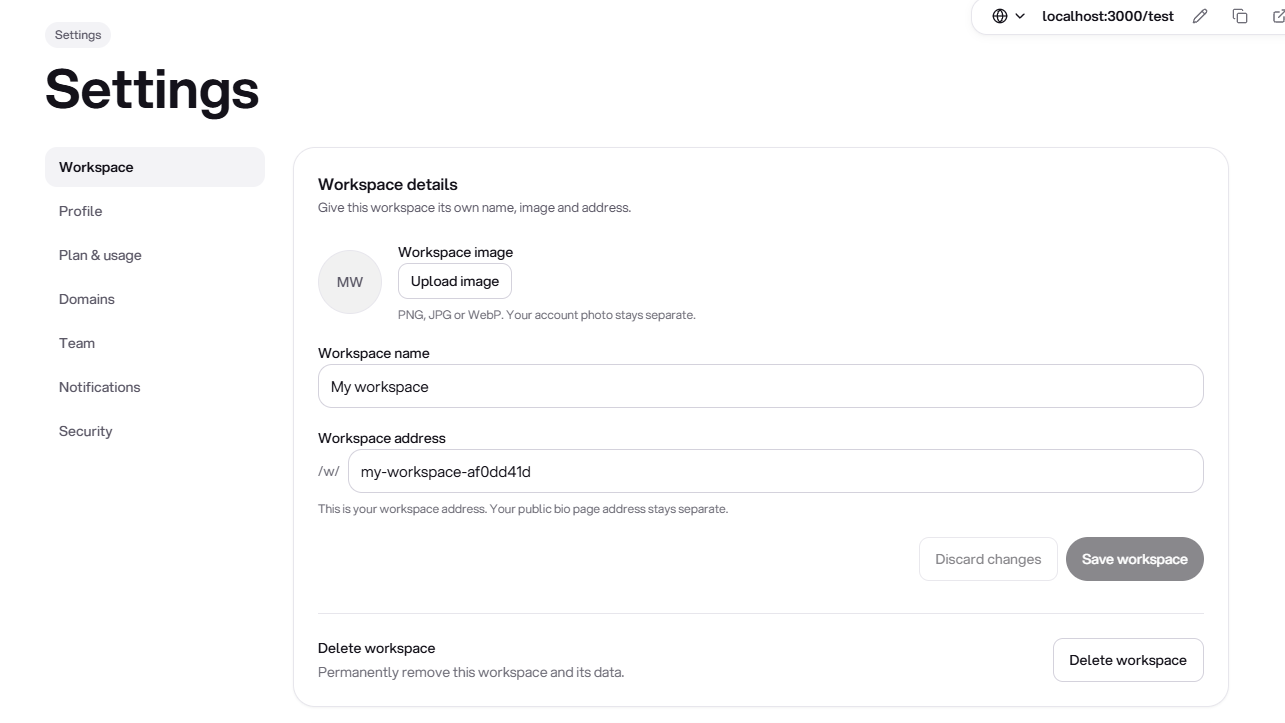
Workspace settings now manage the workspace itself, separately from your bio page design.
•
Name and image: Add a recognizable name and workspace image to make projects easier to identify.
•
Unique workspace address: Choose a workspace slug for dashboard navigation. If it is already taken, Glee lets you know so you can choose another.
•
Quick switching: Open the workspace menu in the sidebar to choose another project or create a new workspace.
Work together with the right access
Invite members to the workspace and choose which parts of Glee they can use. Permissions cover page editing and publishing, page creation, links, QR codes, analytics, audience, email, bookings and wallet tools.
Access belongs to the workspace you share. Inviting someone to one project does not give them access to every workspace in your account.
A straightforward start
•
Automatic first workspace: New accounts receive a default workspace before onboarding, so there is no extra setup step before creating a page.
•
Existing content stays together: Existing pages and related data are organized under the account’s first workspace. There is no need to recreate them manually.
•
Room for more projects: Each account can create up to 10 owned workspaces, including the first one.
Good to know
Your subscription and account-level usage allowances remain shared across workspaces. Creating another workspace does not create a separate subscription or add a new allowance. Workspace slugs organize your dashboard; your public bio page and short-link addresses remain separate.
Get updates like this by email
One email when something ships. Nothing in between.