
Introducing Workflow Builder – Automation with Triggers & Actions
TTushar Kumar Shaha24 Jan 2026
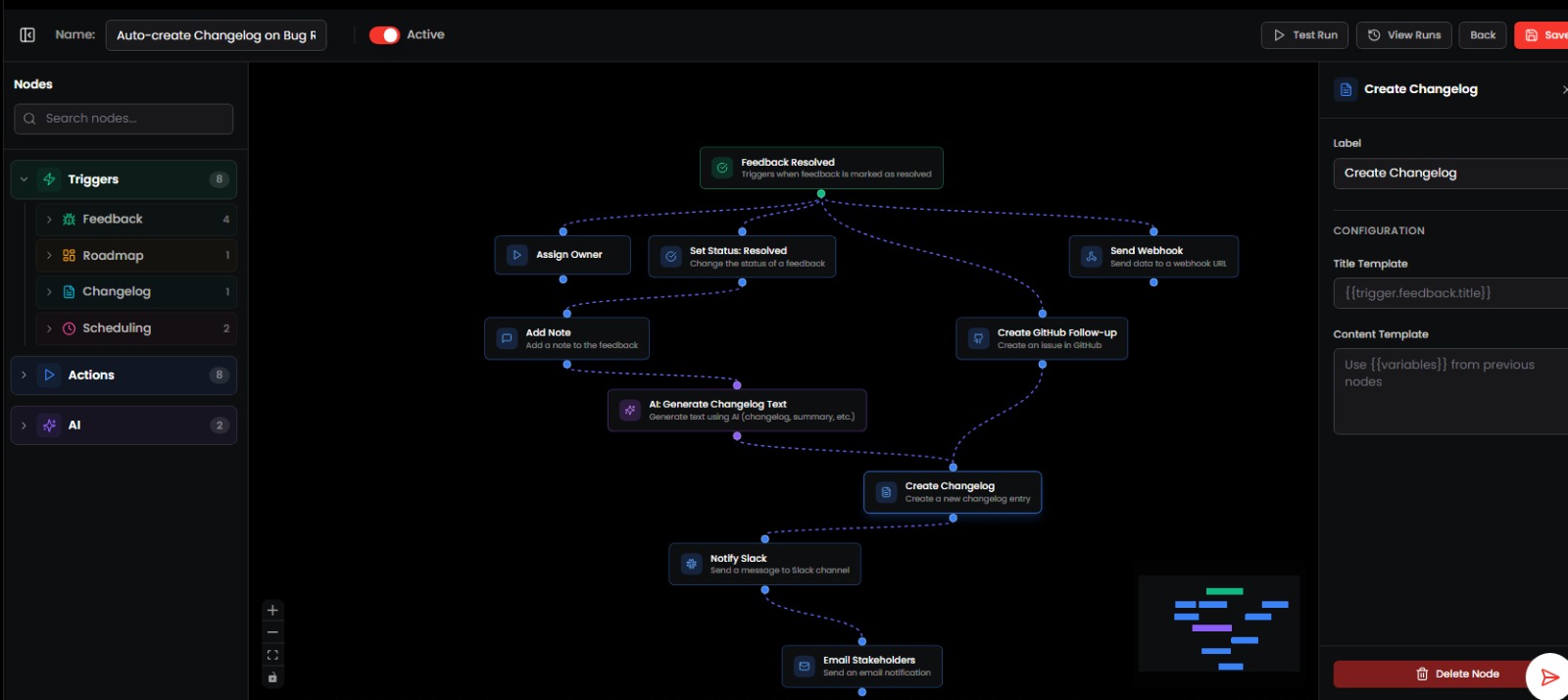
We’ve launched the Workflow Builder, enabling users to automate processes across Rectify by creating custom workflows based on key product events. This helps teams reduce manual work and respond faster to important updates.
New Feature: Workflow Builder
•
Trigger-Based Automation – Create workflows using triggers from:
•
Feedback
•
Roadmap
•
Code Scan
•
Monitoring
•
Inbox
•
Changelog
•
Custom Workflow Actions – Define actions that automatically run when a trigger event occurs.
•
Flexible Automation Logic – Combine triggers and actions to support a wide range of operational workflows.
Workflow Monitoring
•
Workflow Runs Log – View detailed logs for each workflow execution.
•
Execution Visibility – Track status, timing, and outcomes of workflow runs for easier debugging and auditing.
Improvements
•
Reduced manual effort through event-driven automation
•
Better consistency in handling recurring tasks
•
Increased transparency with full workflow execution history
Notes
•
Workflow actions execute automatically when trigger conditions are met
•
Logs are retained to help diagnose failed or partial workflow runs
•
Workflow capabilities will continue to expand with additional triggers and actions
Get updates like this by email
One email when something ships. Nothing in between.