
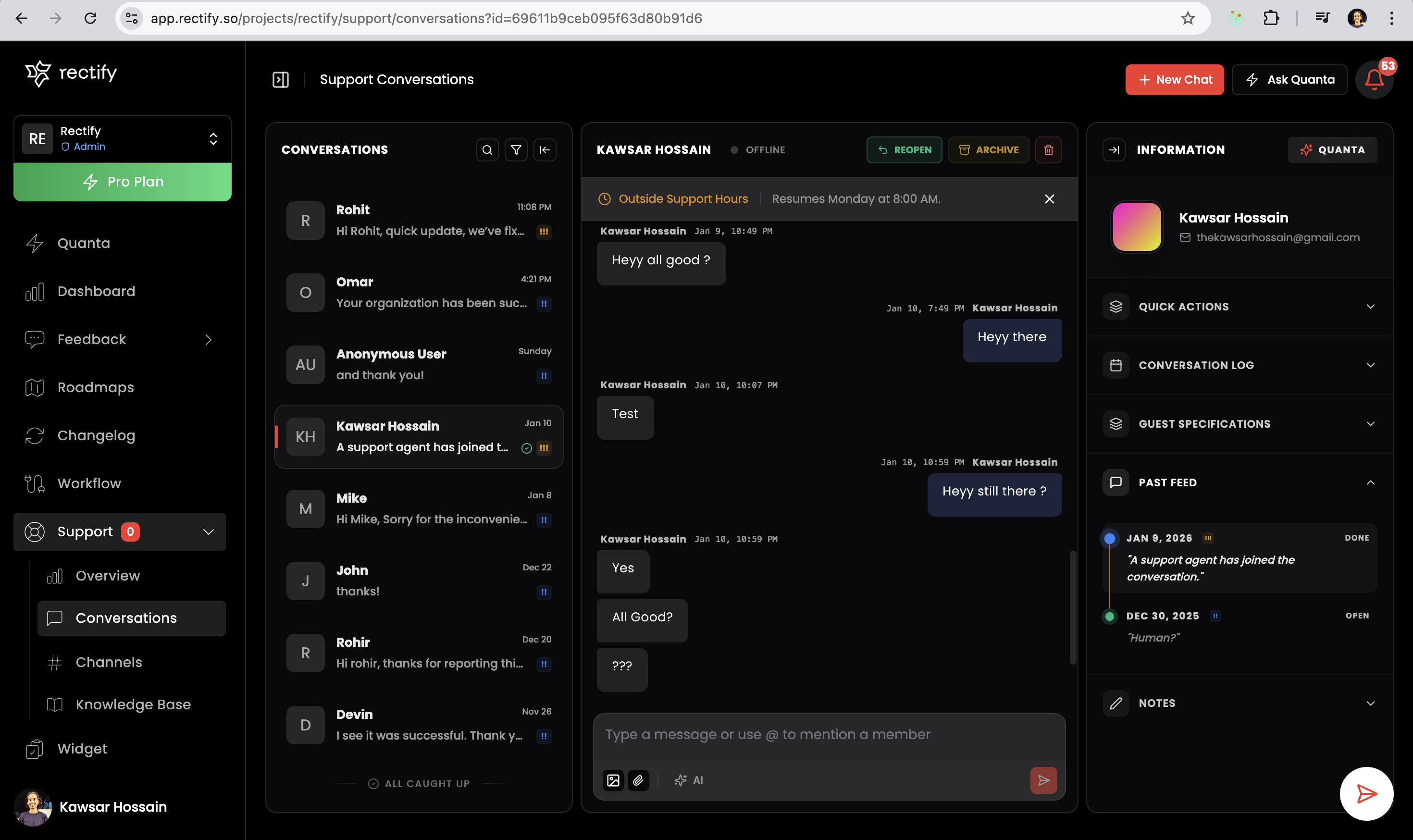
Support Chat V2 - Release Notes
KKawsar Hossain24 Jan 2026
We've completely rebuilt our support chat system with powerful new features to help you provide better customer support.
Highlights
AI Assistant for Your Team
Meet Quanta, your new AI-powered inbox assistant. It helps your support agents draft professional replies, find relevant feedback, and access previous conversations - all in real-time. Just ask Quanta for help, and it'll suggest responses based on your conversation context.
Three Ways to Handle Support
Choose how you want to support your customers:
•
AI First - AI handles initial contact, brings in humans when needed
•
Only AI - Fully automated support experience
•
Only Human - Direct connection to your team, no AI involved
Real-Time Everything
Conversations now happen in real-time with WebSocket technology. See messages instantly, know when agents are typing, and get live updates without refreshing.
Powerful Analytics Dashboard
New overview page shows you:
•
Total conversations and active chats
•
AI resolution rate and accuracy
•
Average response times
•
Peak activity hours
•
Top performing agents
•
14-day conversation trends
Reply to Specific Messages
Click any message to reply directly to it. Perfect for answering specific questions in long conversations.
System Activity Logs
Automatically track important events like when agents join conversations, when chats are marked as done, or when conversations are reopened.
Smart Conversation Management
•
Filter by status, priority, assignee, or type
•
Search across all messages
•
Set priority levels (Urgent, High, Medium, Low)
•
Assign conversations to specific agents
•
View complete conversation history per user
Knowledge Base Improvements
Train your AI with multiple content sources:
•
Upload documents (PDF, DOC, TXT, MD)
•
Add FAQs
•
Scrape website content
•
Connect API sources
Widget Customization
New configuration options for your support widget:
•
Quick Bubbles - Add conversation starters that float above the input
•
Special Notices - Display important messages at the top of chats
•
Custom Greetings - Personalize the initial message users see
•
Agent Selection - Choose which team members appear on the widget
•
Operating Hours - Set availability schedules with automated away messages
•
Conversation Controls - Prevent replies to closed conversations
•
Sound Notifications - Get audio alerts for new messages
•
Favicon Badge - See unread message counts directly in your browser tab icon
Transcript Export
Users can download conversation transcripts when chats are marked as done - perfect for record keeping.
Coming Soon
Multi-channel support for Facebook, Instagram, Twitter, WhatsApp, Telegram, and Discord. Manage all your customer conversations from one unified inbox.
For Your Team
Support Agents will love:
•
AI assistant that helps draft replies
•
Quick access to user history and feedback
•
Voice-to-text for faster responses
•
Real-time conversation updates
Administrators get:
•
Comprehensive analytics dashboard
•
Agent performance tracking
•
Flexible support type configurations
•
Advanced filtering and search
That's it! Your support chat is now smarter, faster, and more powerful than ever.
Get updates like this by email
One email when something ships. Nothing in between.