Let people in your Discord server get help in a private thread or a direct message, answered by Quanta and your team from Conversations.
7 min readUpdated 2 days ago
Before you start. Your Discord server needs to be connected to the project. Connect Discord shows how. Discord chats use your widget chat's answers and hours, so set up widget chat first. Owners, Admins and Members can change these settings. On the free Idea plan, your team's replies to Discord chats count toward its 10 Support Inbox replies a month.
With support chat in Discord, people in your server ask for help with /support or a Get help button. The chat opens in a private thread or a direct message. Quanta answers first if your widget chat works that way, and your team replies from Inbox, Conversations, next to your widget chats.
Turn on support chat
1.
Open Inbox, then Channels.
2.
Under Live, find Discord. Its settings open below it. Settings hides or shows them.
3.
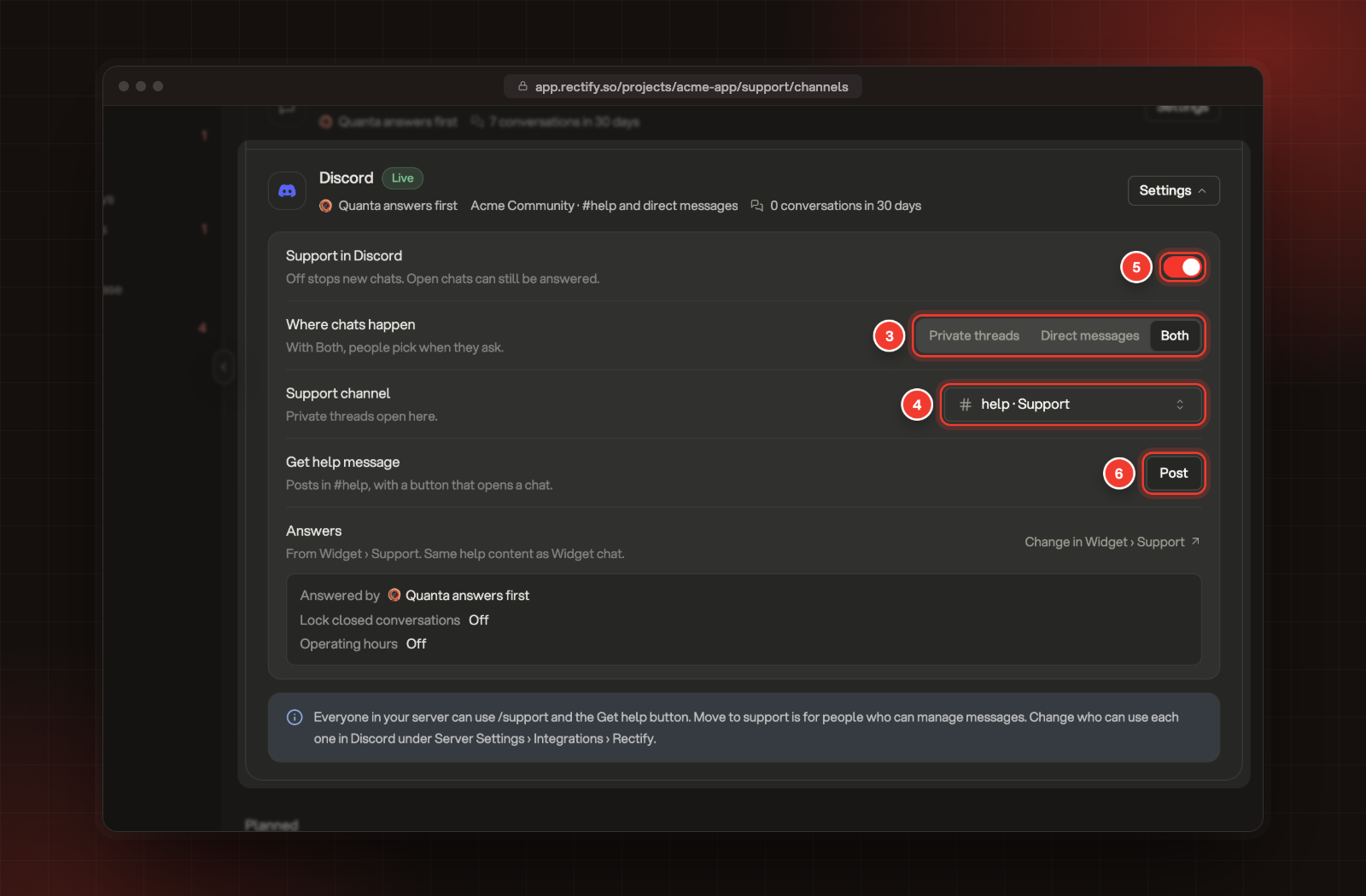
Under Where chats happen, pick Private threads, Direct messages or Both. With Both, people pick when they ask.
4.
If chats can open in private threads, pick a channel under Support channel. Each private thread opens in that channel.
5.
Switch on Support in Discord.
6.
Under Get help message, select Post. Rectify posts a message with a Get help button in your support channel.
3 Where chats happen. 4 Support channel. 5 Support in Discord. 6 Post.
Each change saves straight away. With private threads allowed, Support in Discord stays greyed out until you pick a support channel.
With Direct messages only, there's no support channel. Pick the channel for the Get help message next to Post instead. Its button opens a chat in direct messages.
The Get help message says "Need help with Acme App?" and "Press Get help to chat with the Acme App team in private.", with your project's name. Post again posts a fresh one and removes the old one, for example when you want it in another channel.
Switching Support in Discord off stops new chats. Chats that are already open can still be answered.
Fix the support channel's permissions
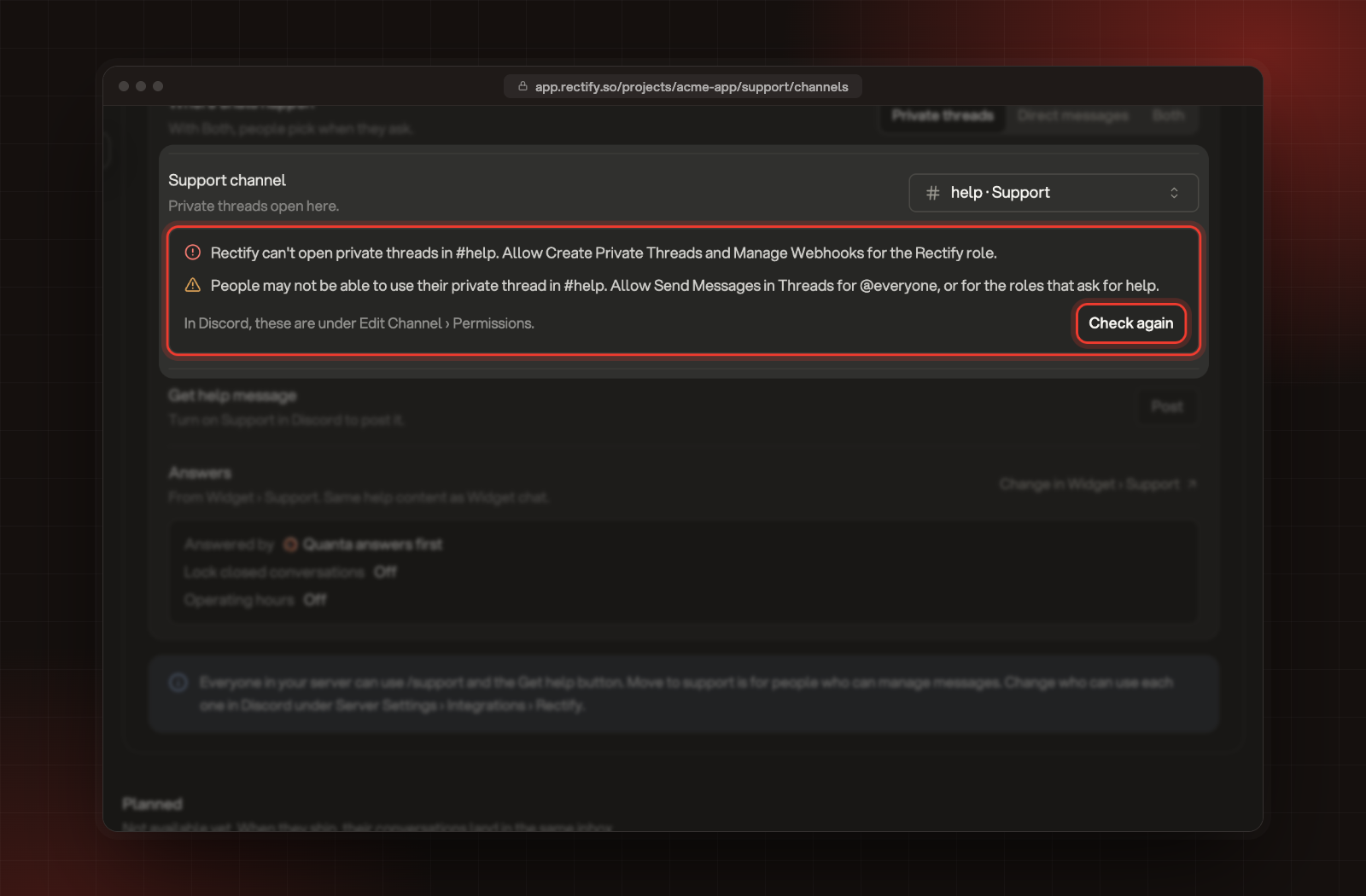
When you pick a support channel, Rectify checks its permissions in Discord. If something is missing, lines under Support channel say what:
•
"Rectify can't open private threads in" your channel: the Rectify role needs the permissions it lists. Until it has them, Support in Discord can't use that channel.
•
"People may not be able to use their private thread in" your channel: everyone, or the roles that ask for help, need the permissions it lists to see the channel and write in their thread. Chats can still open.
In Discord, open the channel's Edit Channel, then Permissions, and allow what's listed. Then select Check again.
The permission lines and Check again under Support channel.
Approve new permissions in Discord
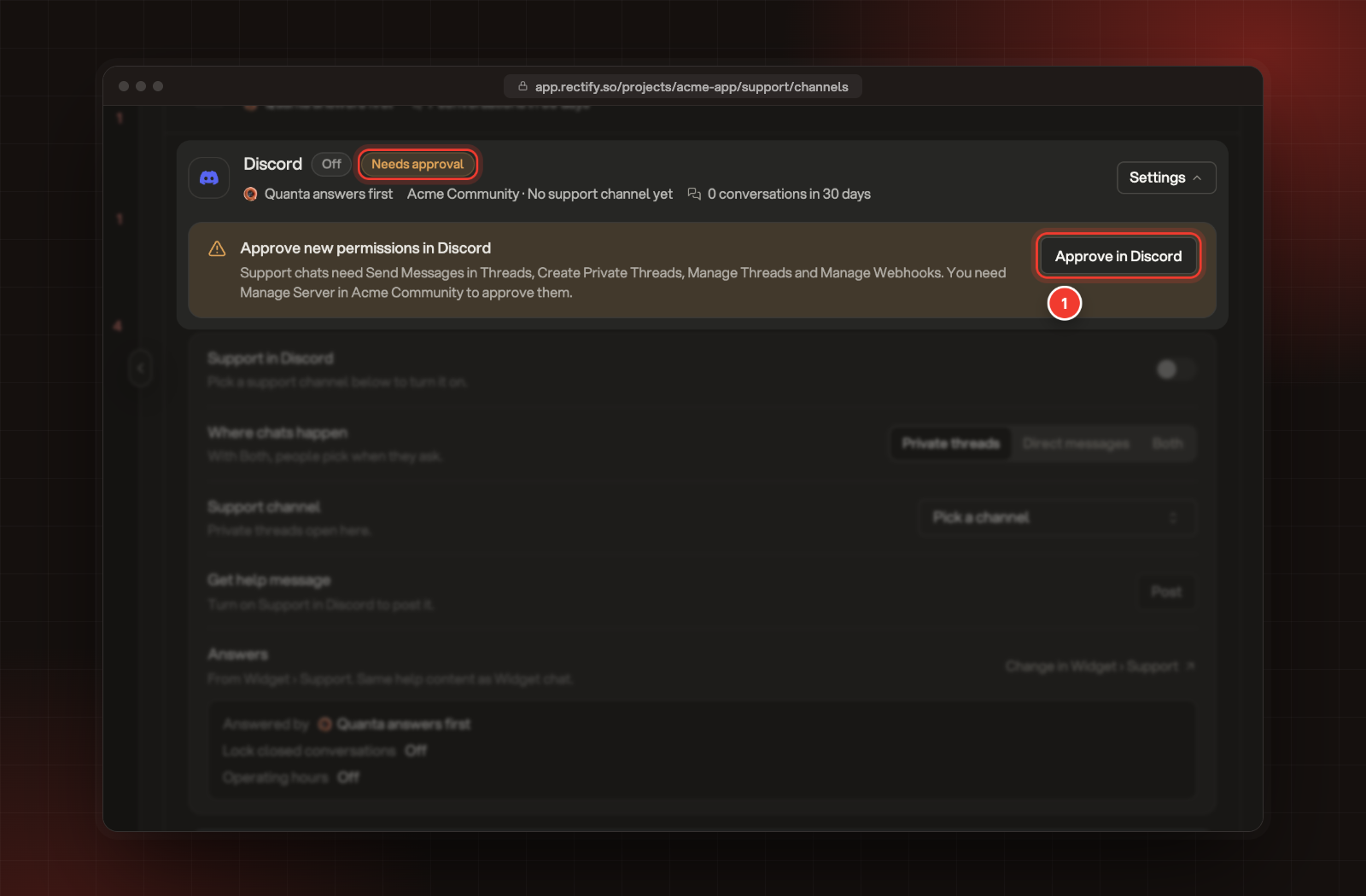
If you connected Discord before support chat was available, Rectify needs a few more permissions in your server. The Discord row shows Needs approval, and a box above the settings says Approve new permissions in Discord. It lists the permissions, for example Create Private Threads, Send Messages in Threads, Manage Threads and Manage Webhooks.
1.
Select Approve in Discord.
1 Approve in Discord, next to the permissions it asks for.
2.
In Discord, approve the permissions for your server. You need Manage Server in that server.
Discord brings you back to Channels with "Discord permissions approved. Support chats can open in your server now."
Answers come from widget chat
Discord chats follow your widget chat's settings. Answers in the Discord settings shows the current Answered by, Lock closed conversations and Operating hours. To change them, select Change in Widget › Support. Choose who answers first: Quanta or your team explains each choice.
Who can start a chat
The note at the bottom of the Discord settings sums it up:
•
Everyone in your server can use /support and the Get help button.
•
Move to support is for people who can manage messages, such as your moderators.
To change who can use each one, open your server in Discord and go to Server Settings, Integrations, Rectify.
What people in your server see
Each person can have one open chat with your project at a time.
Starting a chat
•
/support: they type /support and their question. Questions can be 3 to 1,500 characters.
•
Get help: the button on your Get help message opens a short form that asks "What do you need help with?".
•
Move to support: a moderator picks Move to support from the Apps menu on someone's message. The chat opens for the person who wrote it, and their message and its files become the first message. The conversation shows who moved it.
With Both, Rectify asks "Where do you want to chat with the Acme App team?" with Private thread and Direct messages buttons. Messages a moderator moves open in a private thread when threads are allowed, and by direct message otherwise.
Private thread or direct message
•
Private thread: Rectify opens a thread called "Support · " and the person's name in your support channel, adds them to it and posts their question. Only they see the reply "Your chat is open:" with a link to the thread.
•
Direct message: Rectify sends them a direct message that starts "You are chatting with the Acme App team from Acme Community. You asked:" and their question. If they don't accept direct messages from the server, Rectify tells them how to turn them on, and offers a private thread instead when threads are allowed.
If they ask again while their chat is open, Rectify replies "You already have an open chat:" with a link to it. A chat you've marked Done doesn't count.
Who answers
•
Quanta first: Quanta answers from the same help content as widget chat, under the name and picture you gave Quanta in your widget settings. Its answers have a Talk to our support team button, and the chat moves to your team when the person selects it, just like in the widget.
•
Quanta only: Quanta answers everything, and the button never shows.
•
Team only: the chat goes straight to your team. If you've set operating hours and it's outside them, the person gets your away message.
Your team's replies show in the thread or direct message with the teammate's name. Answer chats in the support inbox covers replying.
When a chat is done
When you mark a chat Done, the thread or direct message gets "Conversation marked as done".
•
With Lock closed conversations off, the person can keep writing in the same chat.
•
With it on, the thread is locked. In a direct message, a later message gets "This chat is closed. Use /support in Acme Community to start a new one."
Reopen unlocks the thread and posts "Conversation reopened".
Check it worked
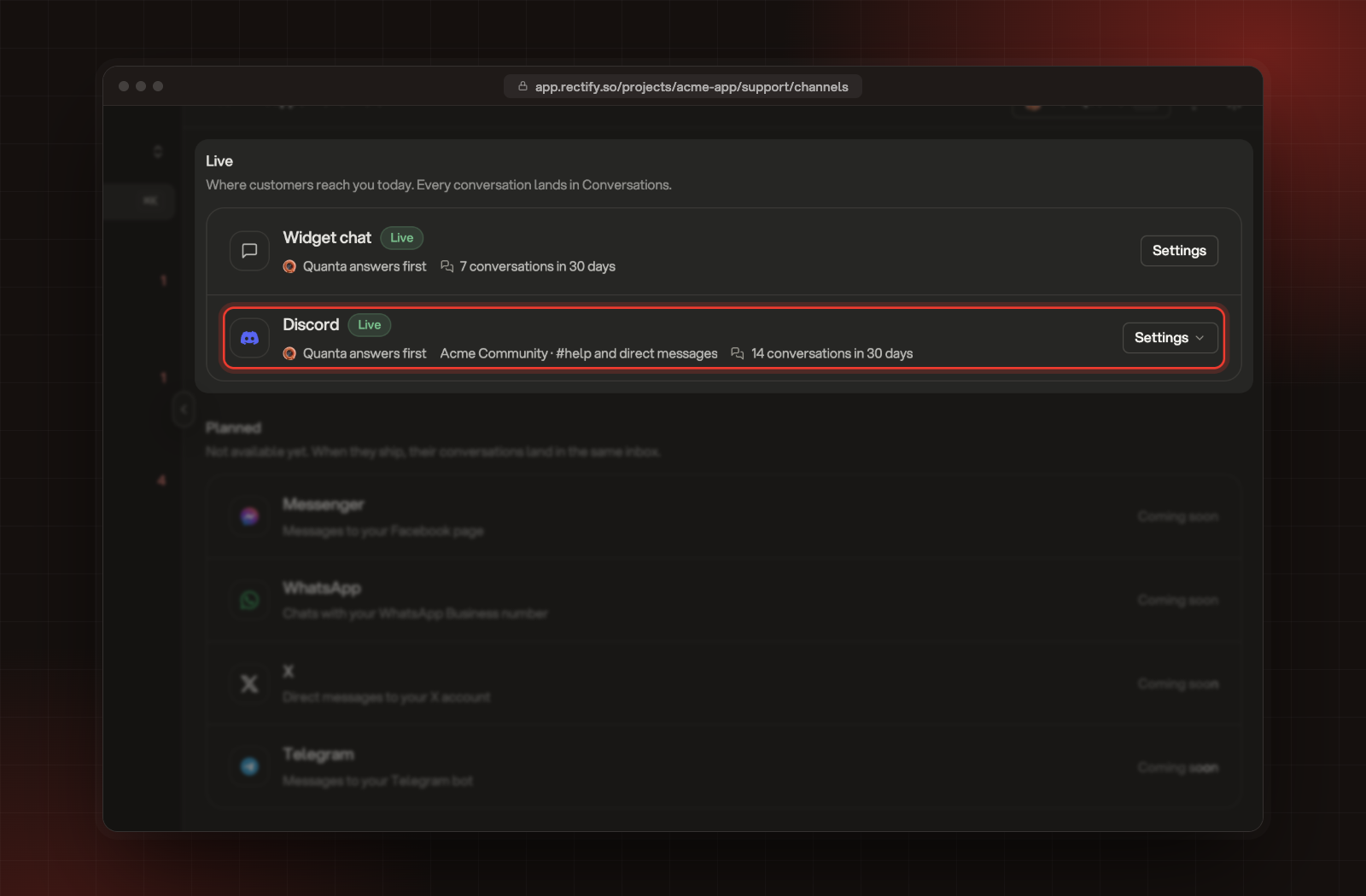
In Channels, the Discord row shows Live, who answers, your server, where chats happen and how many conversations started in the last 30 days.
The Discord row, live.
Then type /support with a question in your server. The chat appears in Inbox, Conversations with the Discord mark next to it.
The row shows
What it means
Live
People can start chats.
Off
Support in Discord is switched off.
Paused
Discord is paused in Integrations. Nothing comes in until you switch it back on.
Needs approval
Rectify needs new permissions in your server. Select Approve in Discord.
Not connected
Discord isn't connected to this project. Select Connect.
Removed
Rectify was removed from your server, so chats there can't get replies. Select Add it again.
Troubleshooting
Support in Discord is greyed out
Pick a support channel first. While private threads are allowed, support needs a channel to open them in.
Post is greyed out
Switch on Support in Discord first. If it says "Rectify can't post in #help", allow Send Messages and Embed Links for the Rectify role in that channel, then come back to Channels.
It says "Rectify can't see any text channel."
Give the Rectify role View Channel on at least one text channel in Discord, then come back to Channels.
People get "Support chat is not turned on for this server."
Switch on Support in Discord in Inbox, Channels.
People get "Rectify is paused in this server."
Discord is paused for this project in Integrations. Switch it back on there.
People get "You have sent a lot in a short time."
Each person can send Rectify 5 questions, ideas or bug reports in 10 minutes, and a server 300 a day. They can try again in a few minutes.