Let Quanta find the likely cause of a bug report, point to the code, and open a draft pull request with a fix for you to review.
4 min readUpdated 24 days ago
Before you start. Triage works on bug reports. Anyone who can open the project can run it, and it uses your organization's AI: your own AI provider key, or the AI credits included with paid plans. To have Quanta write a fix, you also need GitHub connected with a repository, and your own AI provider key, since credits can't be used for fixes. Only Owners and Admins can start a fix.
Quanta reads everything captured with a bug report (the description, console errors, failed requests, clicks and screenshots) and, with GitHub connected, your code. It explains what most likely broke and where, and can open a draft pull request with a fix.
Triage a bug report
1.
Open Inbox, then Feedback, and select a bug report.
2.
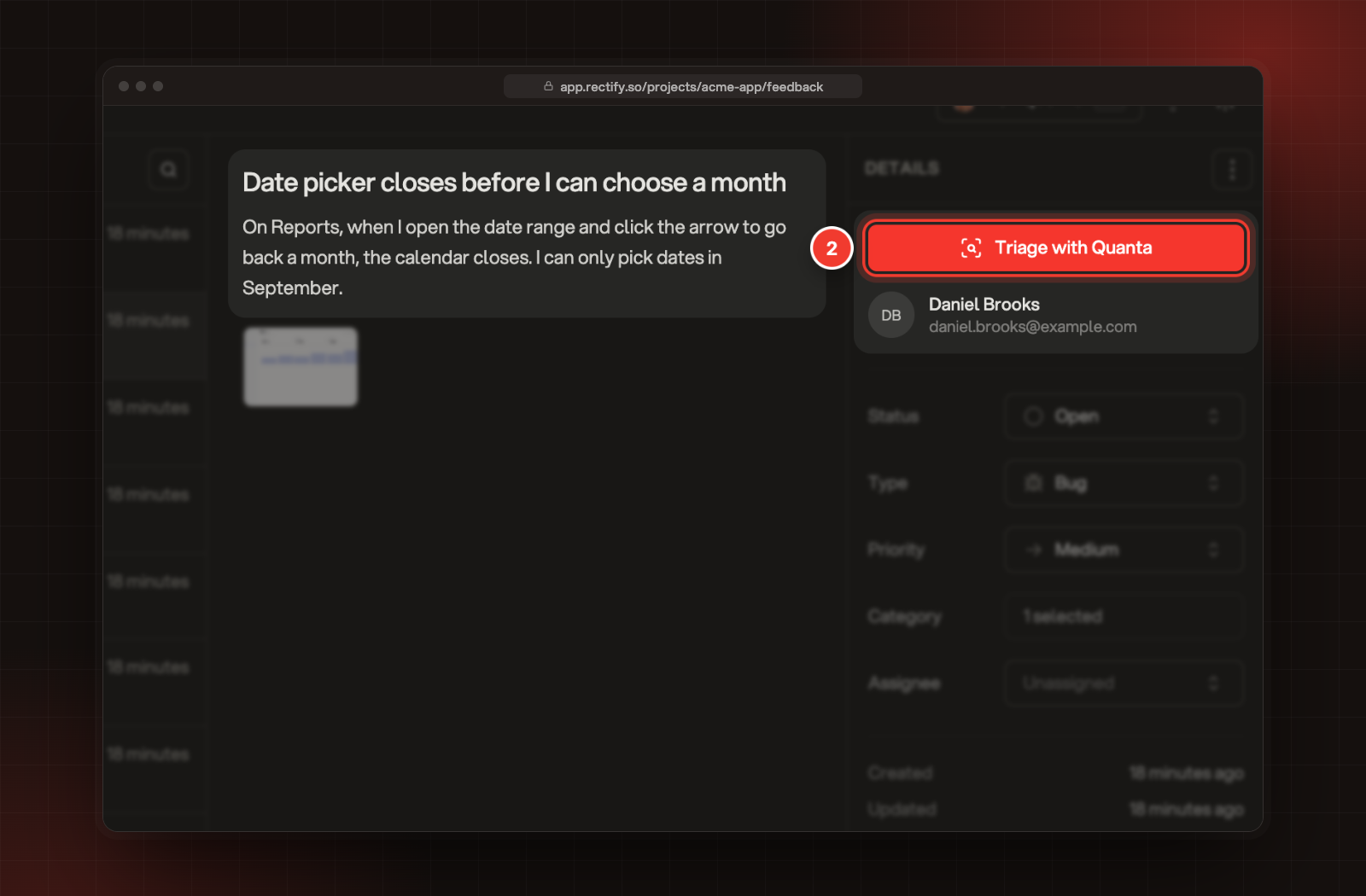
Select Triage with Quanta at the top of Details.
2 Triage with Quanta, above the reporter.
3.
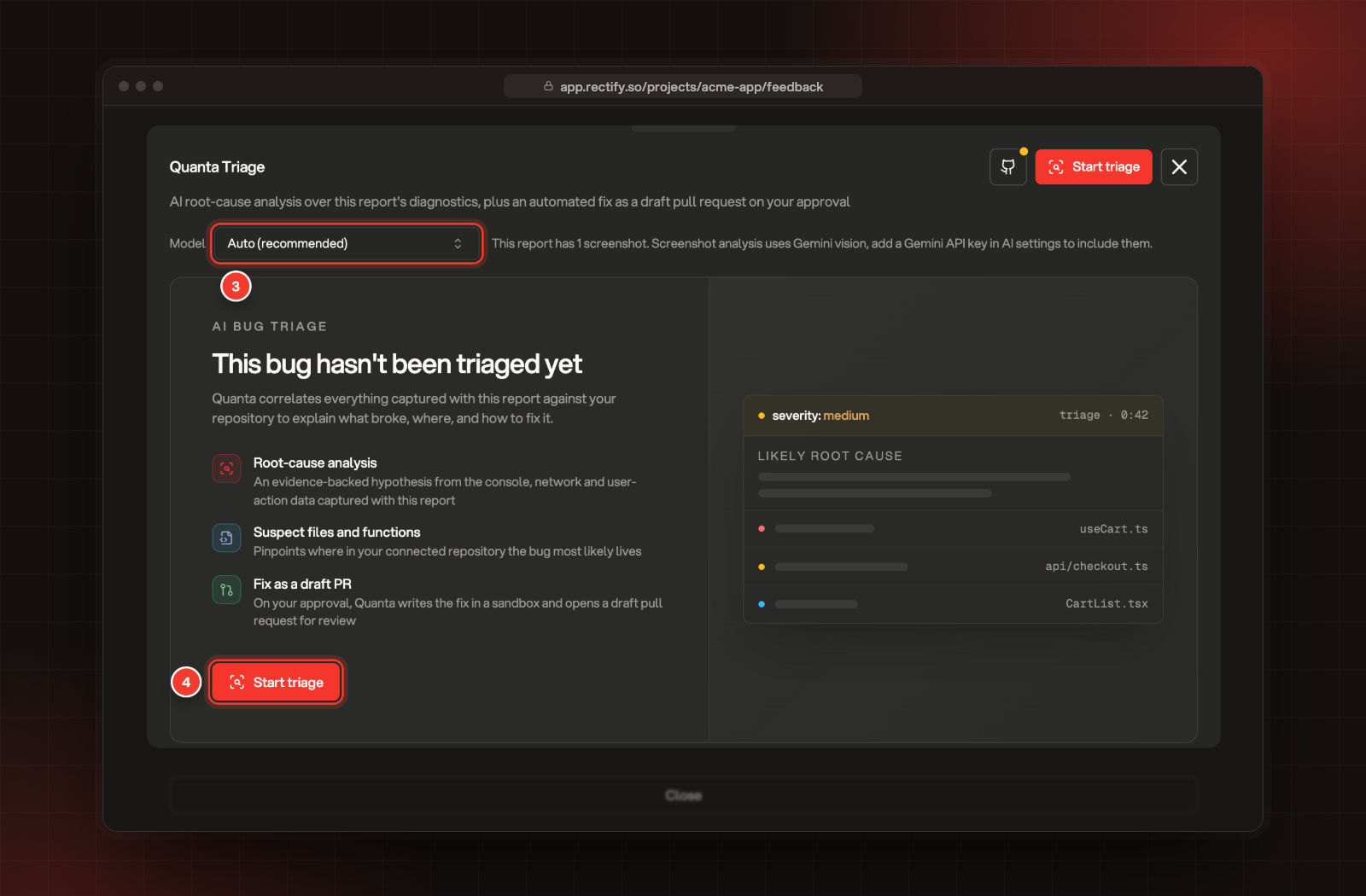
Optionally, pick a Model. Auto (recommended) lets Rectify choose.
4.
Select Start triage.
3 Model. 4 Start triage.
Quanta works through Diagnostics, Screenshots, Repository, Suspect code and Report. You can close the panel while it runs. You get a push notification when the report is ready, and the button changes to Quanta Report.
Screenshots are read with Gemini, so Quanta looks at them only when you've added your own Gemini key under Organization settings, AI providers. It reads up to three.
Read the report
Select Quanta Report to open it. The report shows:
•
the severity and a suggested priority. The report's own Priority doesn't change until you set it.
•
a short summary of what happened.
•
Likely root cause, with how confident Quanta is and the evidence behind it.
•
Suspect files, linked to your repository on GitHub.
•
Reproduction steps and Suggested fixes.
To run it again, for example after connecting GitHub, select Re-triage in the panel.
Without GitHub, Quanta works only from what was captured with the report. To add your code, select Connect GitHub (or Connect GitHub to enable automated fixes), then Connect GitHub Account, and approve Rectify on GitHub. Back in Rectify, pick the Repository and select Save. Then run the triage again.
Let Quanta fix it
1.
In the report, select Fix with Quanta.
2.
Read Let Quanta fix this bug?. Quanta copies your repository into a sandbox, writes a fix guided by the report, runs tests where it can, and opens a draft pull request.
3.
Select Start fix.
The panel follows the work: Queued, Cloning repository, Quanta is writing a fix, Validating changes and Opening draft pull request. When it's done, you see Quanta opened a draft pull request, the files it changed and what it cost on your key. Select View draft PR to review it on GitHub.
Nothing is merged without your review, and Quanta never pushes to your default branch. The pull request stays a draft until you mark it ready.
Fix with Quanta doesn't show when Quanta concluded the report needs no code change, or when GitHub access failed during the triage. In both cases, fix the cause and run the triage again.
Ask Quanta about a report
For questions the report doesn't answer, select Ask Quanta below the report and type your question. The Session logs, Screenshots and Attachment buttons include or leave out each one. Reading screenshots needs your own Gemini key.
Check it worked
The button at the top of Details reads Quanta Report, with a dot in the colour of the severity. After a fix, View draft PR opens the pull request on GitHub.
To get a push notification when a triage or a fix finishes, keep Quanta Triage Complete and Quanta Draft PR Ready on in your notification settings.
It says "AI API key not found"
Your organization has no AI key and no AI credits left. Add a key under Organization settings, AI providers.
It says "Add an AI provider API key in AI settings to use Quanta fixes"
Fixes run on your own AI provider key, not on credits. Add a key under Organization settings, AI providers.
It says "Admin access required" when I start a fix
Only Owners and Admins can start a fix. Ask one of them, or ask for the Admin role.
It says "Triage is already running for this feedback" or "A Quanta fix is already in progress for this feedback"
Wait for the current run to finish. If a run seems stuck, you can start a new triage after 10 minutes, or a new fix after 30.
It says "Quanta triage failed"
Open the panel and select Start triage to run it again. If it fails again, pick another Model first.