Post a card for each public request and each changelog entry to your Discord server, and DM the people who follow a request when it moves or ships.
7 min readUpdated 2 days ago
Before you start. Discord must be connected to your project, see Connect Discord. Everyone who can open the project can pick the channels and turn DMs on or off. Cards, changelog posts and portal links need a public portal.
Rectify can keep your Discord community in the loop in three ways, and you can use any of them:
•
Board cards: a card in a channel for each public request, with Upvote and Follow.
•
Changelog posts: each changelog entry in a channel when it goes live.
•
DMs: a direct message to the people who follow a request or a bug report.
Pick the channels
1.
Open Project settings, then Integrations, and select Discord.
2.
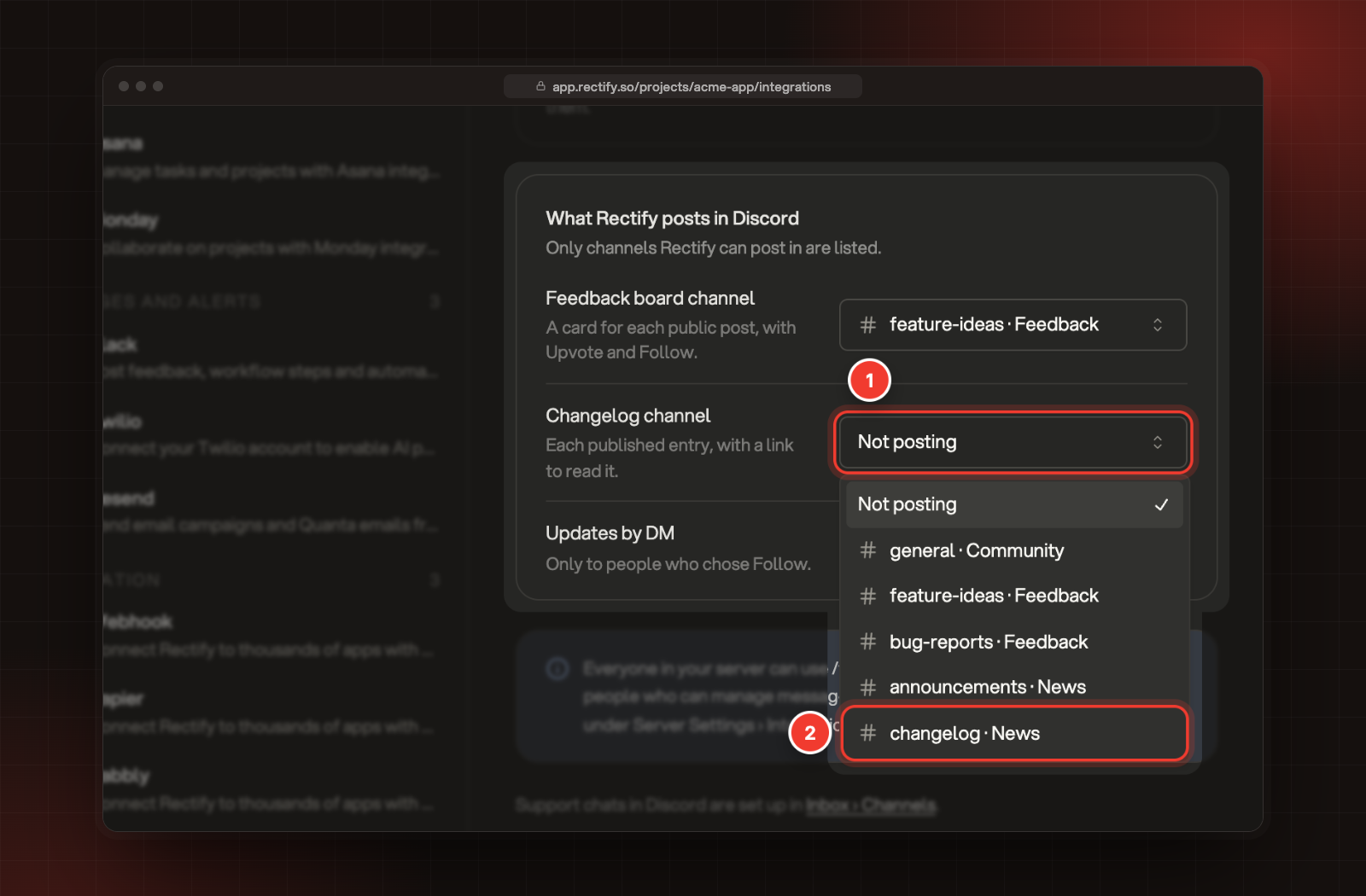
Under What Rectify posts in Discord, open Feedback board channel or Changelog channel.
3.
Pick a channel. It saves straight away.
1 Changelog channel. 2 A channel to post in.
To stop posting, pick Not posting. You can use the same channel for both.
Board cards
Once a Feedback board channel is picked, Rectify posts a card for every request that becomes public from then on: when your team adds it, when you approve it in the review queue, when it's published straight away from your portal, widget or Discord, or when it moves to a board Discord can see. Requests that were already public aren't posted.
Only requests on boards Discord can see get a card. That means your portal is public and everyone or signed-in people can view the board.
Each card shows:
•
The request's title, which opens it on your portal, and who posted it.
•
The start of the request, up to 300 characters.
•
Status, Votes and Board, with the card coloured like the status.
•
Buttons: Upvote, Follow, Share and View on portal.
Upvote shows when Discord people can vote on that board, and Follow shows while Updates by DM is on.
The card keeps up with the request. When its status, votes or text change, Rectify updates the card within about 10 seconds. If the request is deleted, merged into another one or its board stops being visible, the card is removed from the channel.
What the buttons do
Rectify answers each press privately, so only that person sees the reply.
Button
What happens
The reply
Upvote
Adds their vote, the same as a vote on your portal.
Upvoted. 13 votes now.
Follow
They get a DM when the request moves or ships.
You'll get a DM when this moves.
Share
Gives them links to pass on.
Share Calendar view for tasks with this link, followed by the portal link and a link to the card itself.
View on portal
Opens the request on your portal.
Upvoting doesn't follow a request. People who want DMs press Follow, or keep the DM box ticked when they send an idea.
DMs to followers
Rectify only DMs people who asked for it: they ticked Send me updates by DM or DM me when it's fixed in the form, or pressed Follow on a card or Follow updates under a message sent with Send to Rectify.
The DM
When it's sent
Update on and the request's title
You send an update to the request's followers after moving it to a status outside the Completed group. It carries your message.
Shipped: and the request's title
You send an update after moving it to a Completed status, or a changelog entry that links it goes live.
Your post is live or Your post was not approved
You approve or decline an idea they sent from Discord.
Fixed: and the bug's title
You mark a bug report they sent as Resolved. It says "The Acme App team marked this as resolved. Thanks for reporting it."
Each DM is signed "From the Acme App team", with your project's name. It has a View on portal or Read the changelog button when your portal is public, and Stop updates, which unfollows that request or bug report.
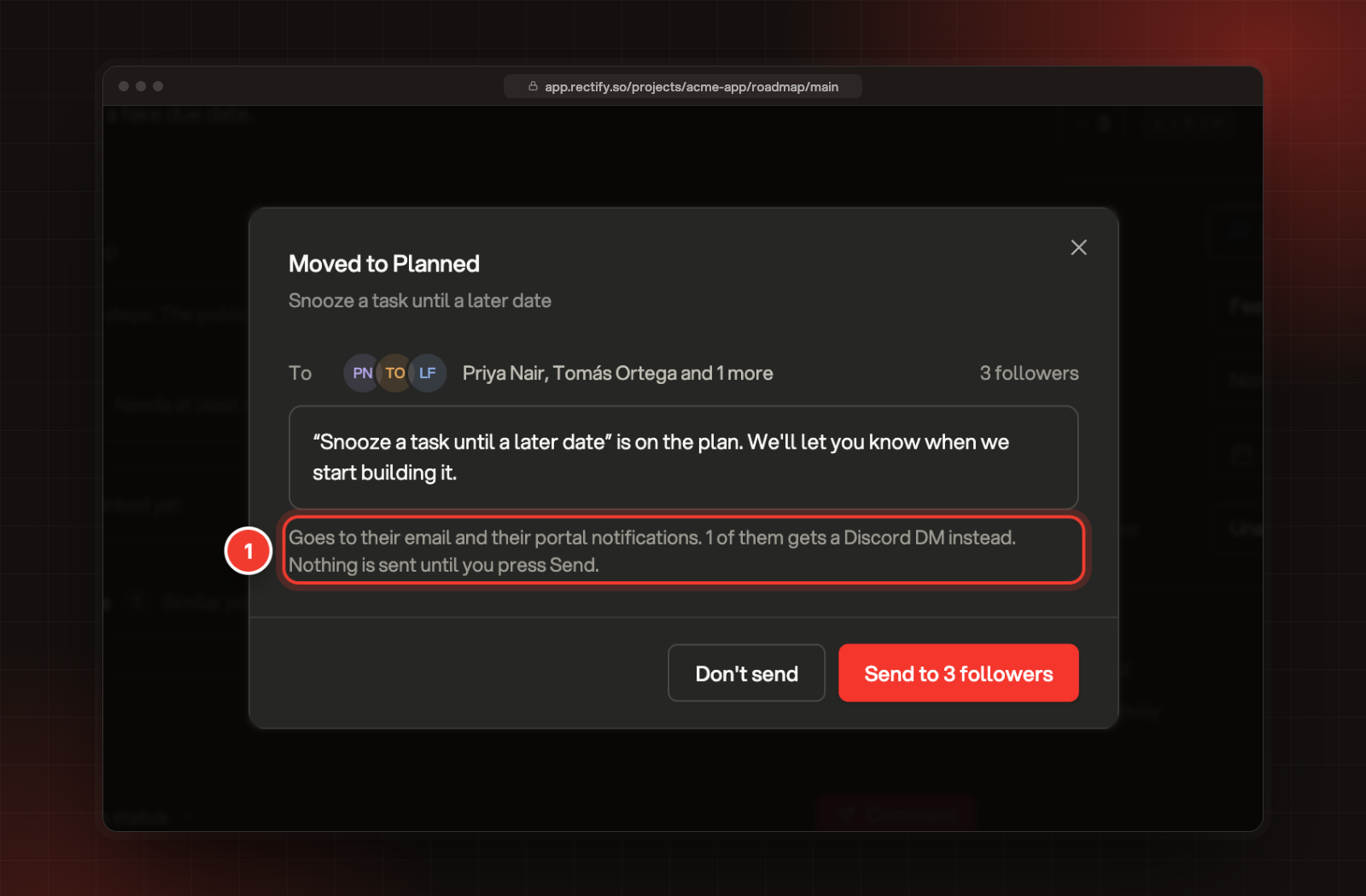
When you send an update from the follower update dialog, followers who came from Discord get it as a DM instead of an email. The dialog says how many.
1 The line that counts followers who get a Discord DM.
DMs only go out while Discord is On and Updates by DM is on. Turn Updates by DM off to stop them all: the DM boxes leave the forms, and Follow no longer shows on new or updated cards. If someone has turned off DMs from server members in Discord, Rectify skips them.
Changelog posts
Once a Changelog channel is picked, Rectify posts each changelog entry there when it goes live, at its scheduled time for a scheduled entry. The post shows:
•
New in Acme App, with your project's name, at the top.
•
The entry's title, which opens it on your portal.
•
The start of the entry, up to 300 characters.
•
"Requested by 3 people in this server", when people from your server voted for a request the entry links.
•
A Read the changelog button.
Changelog posts follow the same rules as the changelog email:
•
An entry you publish without Email subscribers ticked is never posted.
•
Resend email, then Send again, posts it again.
•
Entries limited to segments, and entries on a private portal, are never posted.
When you edit an entry after it's posted, the post in Discord changes too, within a few seconds. Move the entry back to draft, delete it or limit it to segments, and Rectify removes its post from Discord. Publishing it again doesn't post it again, the same way it doesn't email again.
The followers of the requests it links who follow through Discord get a Shipped DM at the same time, even while changelog emails are paused.
Check it worked
Publish a test entry, or approve a request on a board Discord can see, and look in the channel you picked. In the follower update dialog, the line about Discord DMs shows how many followers came from Discord.
Troubleshooting
A public request didn't get a card
Cards are only posted for requests that become public after you pick the channel, on boards Discord can see. Check that your portal is public and that everyone or signed-in people can view the board. Also check that Discord is On.
A changelog entry didn't post
It was published without Email subscribers ticked, it's limited to segments, or your portal is private. To post it now, Owners and Admins can open it and select Resend email, then Send again.
People see "This server has DM updates turned off."
Updates by DM is off. Turn it on in Integrations, Discord.
People see "This post is waiting for review. You can follow it once it's public."
Only the person who sent an idea can follow it while it waits in the review queue. Everyone else can follow it once you approve it.
People see "Upvotes are closed for this post." or "This post is no longer here."
The request was merged or deleted, or Discord people can't vote on its board.
Someone didn't get a DM
They need to follow the request, and their Discord privacy settings must allow DMs from server members. Rectify doesn't try again later. Also check that Discord is On and Updates by DM is on.