
Signed webhooks

Send Rectify events to your own server, check each request's signature, and handle retries, tests and secret rotation.

7 min readUpdated 5 days ago
Before you start. Owners, Admins and Members can add, test, pause and rotate endpoints, and see their deliveries. Only Owners and Admins can delete one. You need a public HTTPS address that accepts POST requests.
A webhook endpoint gets a POST request from Rectify each time an event you picked happens, such as new feedback or a contact entering a segment. Every request is signed, so your server can check it came from Rectify.
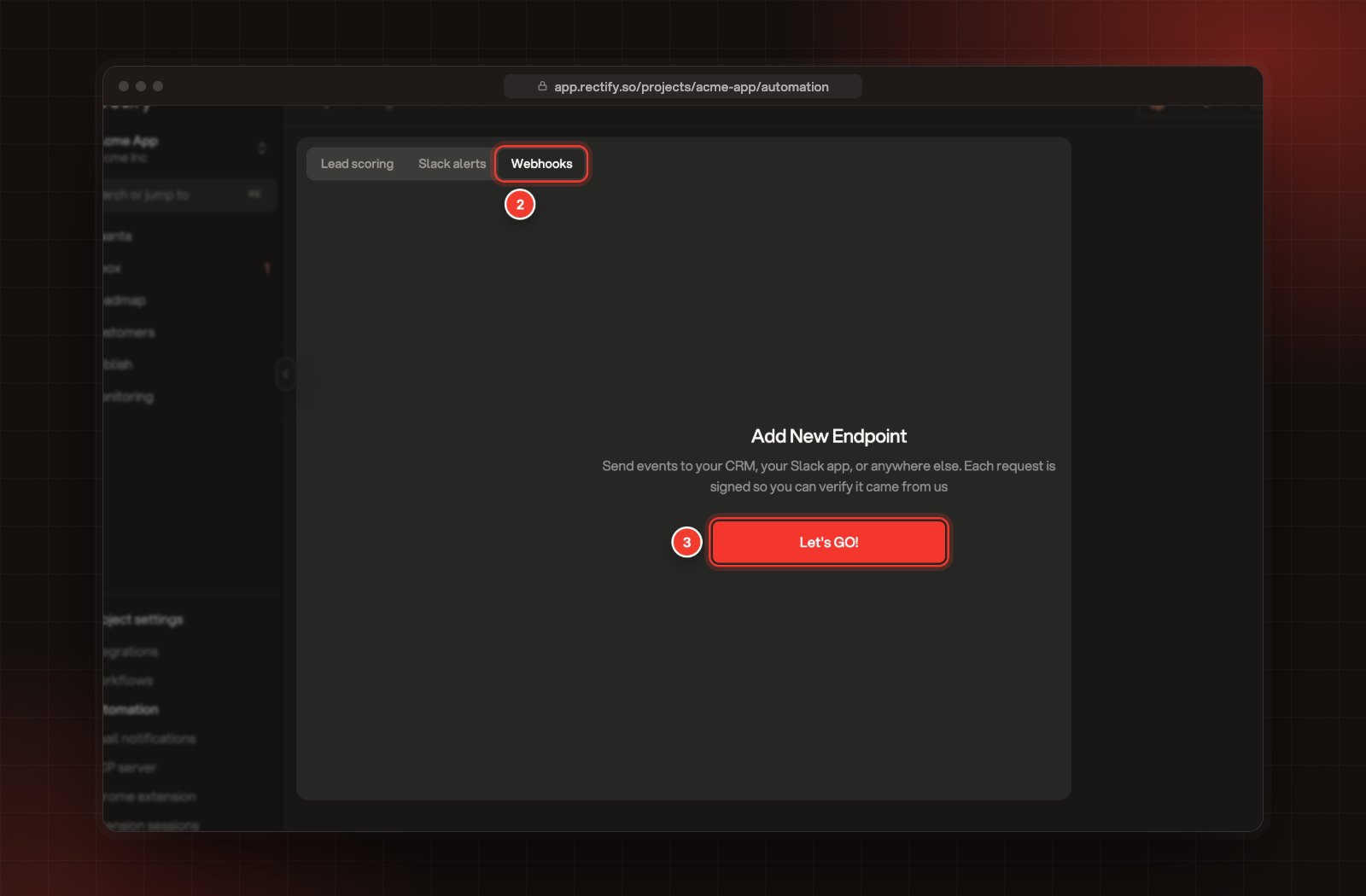
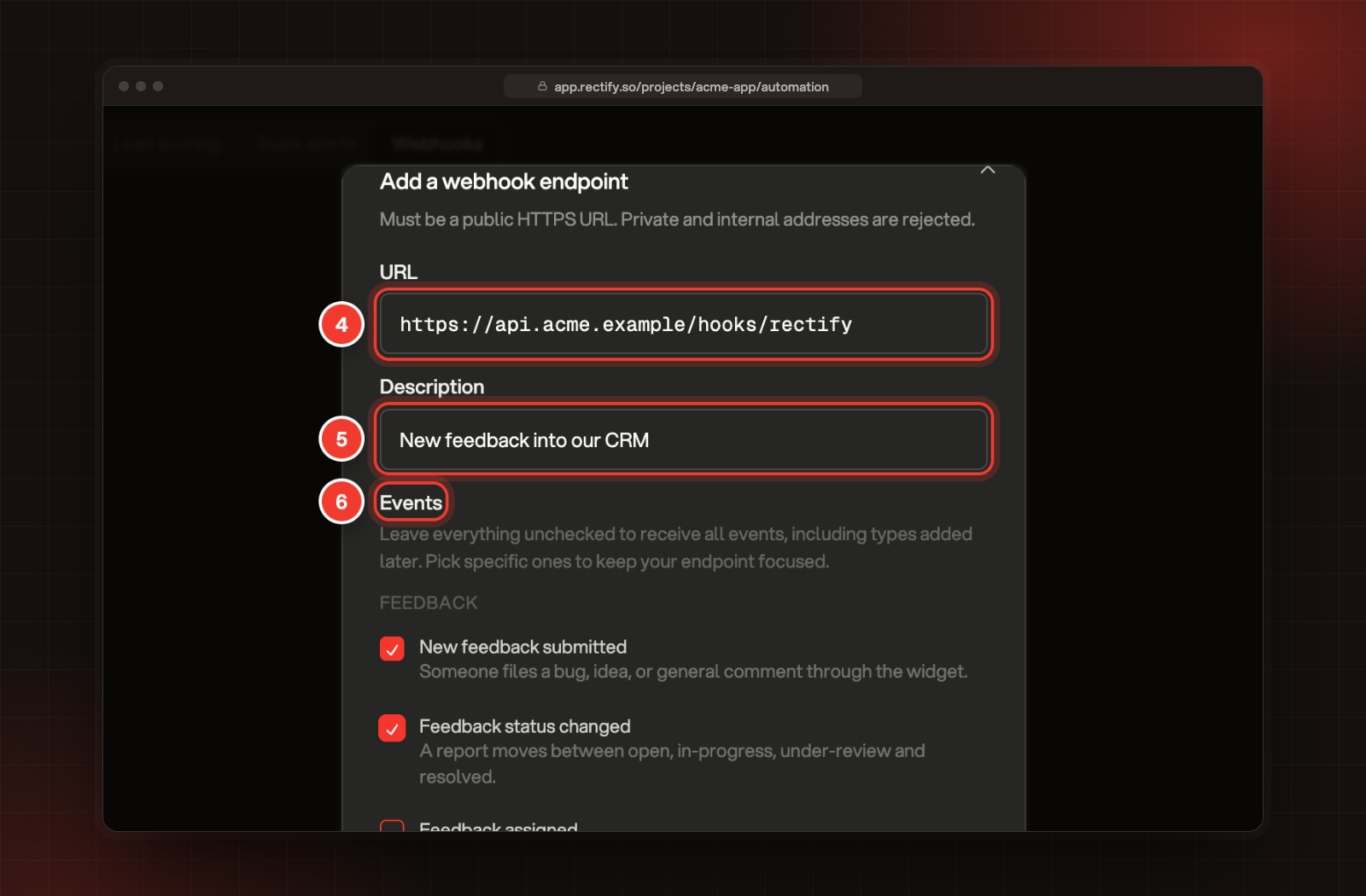
Add an endpoint
1.
Open Project settings, then Automation.
2.
Select the Webhooks tab.
3.
Select Let's GO!, or Add Endpoint if you already have one.
2 Webhooks tab. 3 Let's GO!
4.
Enter the URL of your endpoint.
5.
Add a Description if you like, up to 200 characters.
6.
Under Events, pick the events to send. Leave them all unchecked to get every event, including ones Rectify adds later.
4 URL. 5 Description. 6 Events.
7.
Select Create endpoint.
8.
Copy the secret from Save your signing secret and store it on your server. Then select I have saved it.
The signing secret starts with whsec_ and is shown only this once. A project can have up to 10 endpoints.
Events
Event typeShown asdata fields
feedback.createdNew feedback submittedfeedbackId, type, title, priority, status, pageUrl, reporter (name, email), url
feedback.status_changedFeedback status changedfeedbackId, title, type, priority, fromStatus, toStatus
feedback.assignedFeedback assignedfeedbackId, title, type, priority, assigneeId, assigneeEmail
contact.identifiedVisitor becomes a contactcontactId, visitorId, userId, email, name, traits
segment.enteredContact enters a segmentsegmentId, segmentName, contactId, visitorId
segment.exitedContact leaves a segmentsegmentId, segmentName, contactId, visitorId
score.threshold_crossedLead score crosses a bandcontactId, visitorId, score, previousScore, band, previousBand, direction (up or down)
form.submittedForm submittedcontactId, email, name, visitorId, pageUrl, formName, fieldCount, fields
survey.answeredSurvey answeredsurveyId, surveyName, responseId, contactId, visitorId
help.article_publishedHelp article publishedarticle (id, title, description, url, collection, locale, publishedAt)
help.article_feedbackHelp article ratedarticle (id, title, url), helpful, reason, source, locale
help.search_no_resultsHelp search found nothingquery, normalized, searches, locale, source
A few details:
•
contact.identified fires once, the first time a visitor is identified.
•
form.submitted covers forms on your own site, not the widget's forms. It never includes what people typed.
•
help.search_no_results fires at most once a day for the same search.
What Rectify sends
Each delivery is a POST with a JSON body:
JSON
{
  "id": "evt_6a1f2c3d4e5f6a7b8c9d0e1f",
  "type": "feedback.created",
  "occurredAt": "2026-10-27T09:15:00.000Z",
  "projectId": "6addf8c8f1748a2b2950c3f4",
  "data": {
    "feedbackId": "6a1f2c3d4e5f6a7b8c9d0e20",
    "type": "bug",
    "title": "Export button does nothing",
    "priority": "high",
    "status": "open",
    "pageUrl": "https://acme.example/reports",
    "reporter": { "name": "Jane Doe", "email": "[email protected]" },
    "url": "https://app.rectify.so/projects/acme-app/feedback/6a1f2c3d4e5f6a7b8c9d0e20"
  }
}
The headers:
HeaderValue
Content-Typeapplication/json
User-AgentRectify-Webhooks/1.0
X-Rectify-EventThe event type, such as feedback.created
X-Rectify-DeliveryThe delivery ID. It stays the same when Rectify retries.
X-Rectify-TimestampWhen this attempt was sent, in milliseconds since 1970
X-Rectify-SignatureThe signature, as 64 hexadecimal characters
id is the same for every endpoint that gets the event. Use it, or X-Rectify-Delivery, to skip events you've already handled.
Check the signature
The signature is an HMAC-SHA256 of the timestamp, a full stop and the raw request body, with your whole signing secret as the key, written in hexadecimal:
Plain text
HMAC_SHA256(secret, X-Rectify-Timestamp + "." + raw_body)
Check it against the raw body exactly as it arrived, before you parse the JSON.
import crypto from 'node:crypto';
import express from 'express';

const app = express();

app.post('/hooks/rectify', express.raw({ type: 'application/json' }), (req, res) => {
  const timestamp = req.get('X-Rectify-Timestamp') ?? '';
  const signature = req.get('X-Rectify-Signature') ?? '';
  const expected = crypto
    .createHmac('sha256', process.env.RECTIFY_WEBHOOK_SECRET)
    .update(`${timestamp}.${req.body.toString('utf8')}`)
    .digest('hex');

  const valid = signature.length === expected.length
    && crypto.timingSafeEqual(Buffer.from(signature), Buffer.from(expected));
  const fresh = Math.abs(Date.now() - Number(timestamp)) < 5 * 60 * 1000;
  if (!valid || !fresh) return res.status(401).end();

  const event = JSON.parse(req.body.toString('utf8'));
  res.status(200).end();
  handleEvent(event);
});
The five-minute check on the timestamp is up to you. It stops someone replaying an old request. Rectify sends a fresh timestamp and signature on every attempt, so retries pass it.
Retries and failures
•
Rectify waits up to 10 seconds for an answer. Any 2xx status counts as delivered.
•
Redirects aren't followed, so a 3xx counts as a failure.
•
A failed delivery is tried again, up to 5 attempts in total, with longer waits between them, starting at about 10 seconds.
•
If your endpoint answers with an error 20 times in a row, Rectify turns it off and shows Paused on it. Rectify doesn't email you about this. Fix your endpoint, then turn its switch back on.
•
Events that happen while an endpoint is off aren't sent later.
Answer with a 2xx as soon as you've checked the signature, and do the slow work afterwards.
Test an endpoint
Select Send a test event on the endpoint. Rectify sends a sample of the first event the endpoint listens to, or of Contact enters a segment if it listens to everything. The test is signed like a real delivery. Its id is evt_test, it has "test": true, and its data holds sample values.
See deliveries
Each endpoint lists its recent deliveries: the status code, the event type, the number of attempts, how long it took and when. Rectify keeps deliveries for 14 days.
Rotate the signing secret
Select Rotate the signing secret on the endpoint. Rectify shows the new secret once, in Save your signing secret. The old secret stops working at once, and retries still waiting are signed with the new one. Update your server straight away.
Pause, change or delete an endpoint
•
Use the switch on the endpoint to pause it or turn it back on.
•
To change the URL or the events, delete the endpoint and add it again.
•
To delete, select the delete button, then Delete. Deliveries stop straight away.
URL rules
•
The URL must use HTTPS.
•
Private and internal addresses, such as localhost or 10.0.0.1, are rejected. So are addresses that resolve to them.
•
Usernames and passwords in the URL aren't allowed.
•
Ports 22, 23, 25, 445, 3306, 5432, 6379, 9200, 11211 and 27017 are blocked.
The Webhook integration on the Integrations page is a separate, simpler feature. Its requests aren't signed and aren't retried.
Check it worked
1.
Select Send a test event on your endpoint.
2.
Check that your server logged the request and that the signature matched.
3.
The delivery shows on the endpoint with a 2xx status.
Troubleshooting
The signature never matches
•
Sign the raw body exactly as it arrived. Parsing and re-encoding the JSON changes it.
•
Use the whole secret, including whsec_, as the key.
•
Put a full stop between the timestamp and the body.
•
If you rotated the secret, update your server with the new one.
My endpoint shows Paused
It returned an error 20 times in a row. Fix it, then turn its switch back on.
I get "Webhook URLs must use HTTPS" or "That address is not reachable from webhooks"
Use a public HTTPS address. To test on your own computer, put it behind a public HTTPS tunnel.
I get "At most 10 endpoints per project"
Delete an endpoint you no longer use, or send several event types to one endpoint.

Was this helpful?

Your feedback shapes what we write next.

Related articles