What posts, boards, statuses and roadmaps are, how they connect, and where each one lives in Rectify and on your portal.
3 min readUpdated 24 days ago
Before you start. The roadmap is on every plan. Owners, Admins and Members can add and edit posts, boards, statuses, tags and roadmaps. Only Owners and Admins can delete them, merge posts, change many posts at once, and approve or decline posts that wait for review.
Your customers tell you what they want, vote on each other's ideas and follow along as you build. Four pieces hold this together: posts, boards, statuses and roadmaps.
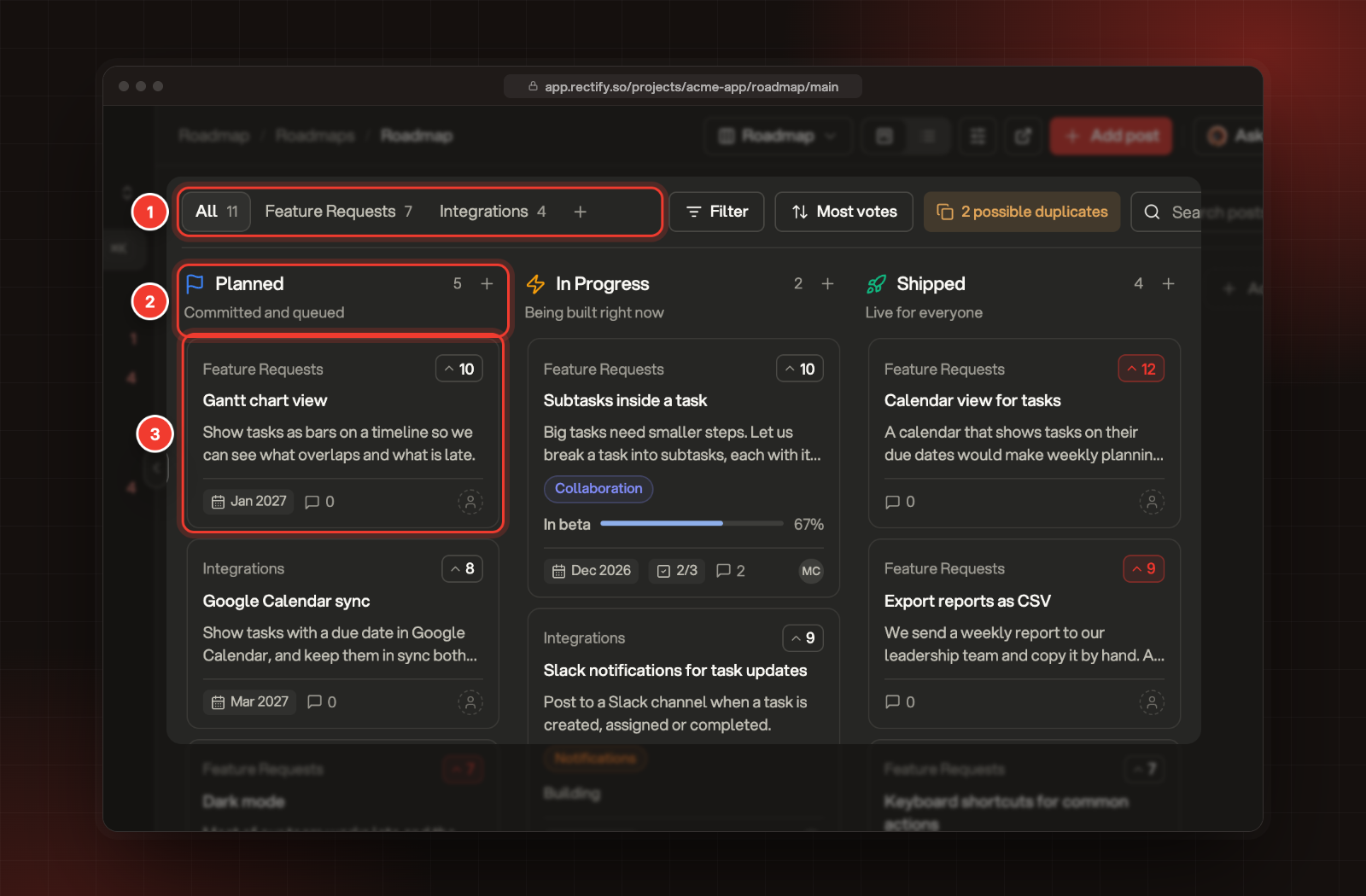
1 Boards. 2 A status column. 3 A post.
Posts
A post is one request or idea, such as "Dark mode". It has a title, a description, votes, comments and followers. Your team can also give it tags, a target date, an assignee and a checklist.
Posts come from three places:
•
Your portal. Visitors post on the Requests page, or select Suggest an idea on the Roadmap page.
•
Your widget. The Roadmap tab has a Requests list with a New request button.
•
Your team. Select Add post in Rectify, for yourself or on a customer's behalf.
Posts from your portal and widget can wait in the Review queue before anyone else sees them. Posts your team adds go live straight away.
Boards
A board is where posts live. Every post sits on exactly one board, and you can move it to another one. Each board decides who can see it, vote, comment and post on it, and whether new posts wait for review.
A new project comes with one board, Feature Requests. Add more to keep different kinds of requests apart, for example one for integrations or one for your mobile app. On your portal, visitors can pick a board on the Requests and Roadmap pages.
Statuses
A status says where a post is in your plan. Statuses are shared by every board and every roadmap. Each one belongs to a group:
Group
Means
Starts with
Reviewing
Not committed yet
Backlog, where new posts land
Planned
Committed and queued
Planned
Active
Being built. Posts here can have a stage, such as In beta
In Progress
Completed
Live. Changelog posts link requests from here
Shipped
Canceled
Won't do
Closed
Changing a post's status never emails anyone by itself. After each move, Rectify asks whether to tell its followers.
Roadmaps
A roadmap is a view of your posts. It doesn't hold posts of its own: it shows the posts that match it, so the same post can appear on several roadmaps at once. Deleting a roadmap leaves every post, vote and comment where it was.
Each roadmap has one of two layouts:
•
Status columns: one column per status. Dragging a card to another column changes its status everywhere, including on your portal.
•
Timeline: one column per month, quarter or half year, based on each post's target date. Dragging a card changes its target month.
A new project comes with one roadmap, Roadmap, with Planned, In Progress and Shipped columns. Each roadmap can be Public, Internal (only your team sees it) or limited to Segments of your contacts, and it can show only some boards, statuses, tags or authors.
Where you work
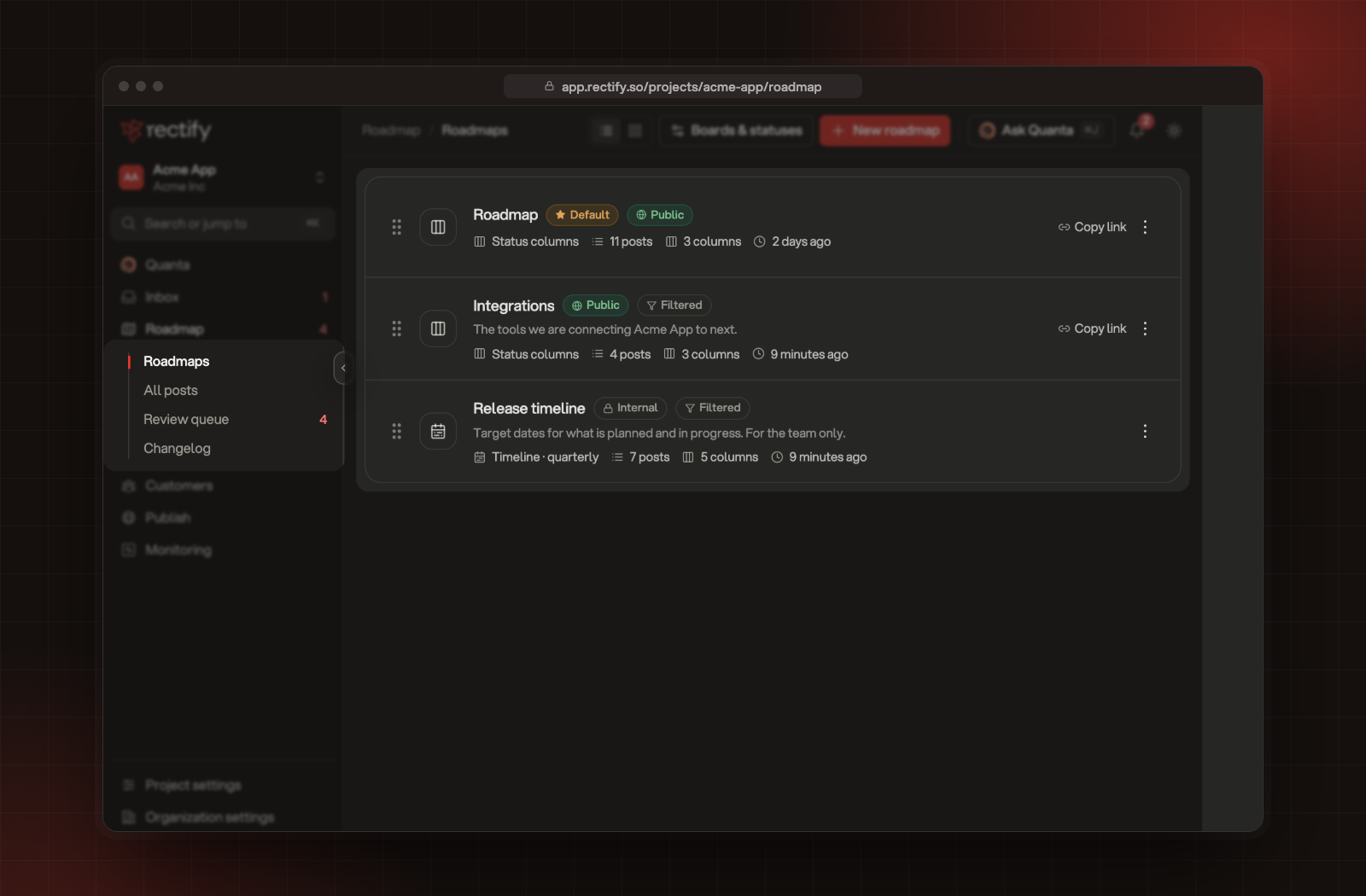
In the sidebar, open Roadmap:
•
Roadmaps lists your roadmaps. Open one to work on its board.
•
All posts is a table of every post, with filters and changes to many posts at once.
•
Review queue holds posts and comments waiting for approval. The number next to it is how many are waiting.
•
Changelog is where you announce what shipped.
The Roadmap section of the sidebar and the Roadmaps page.