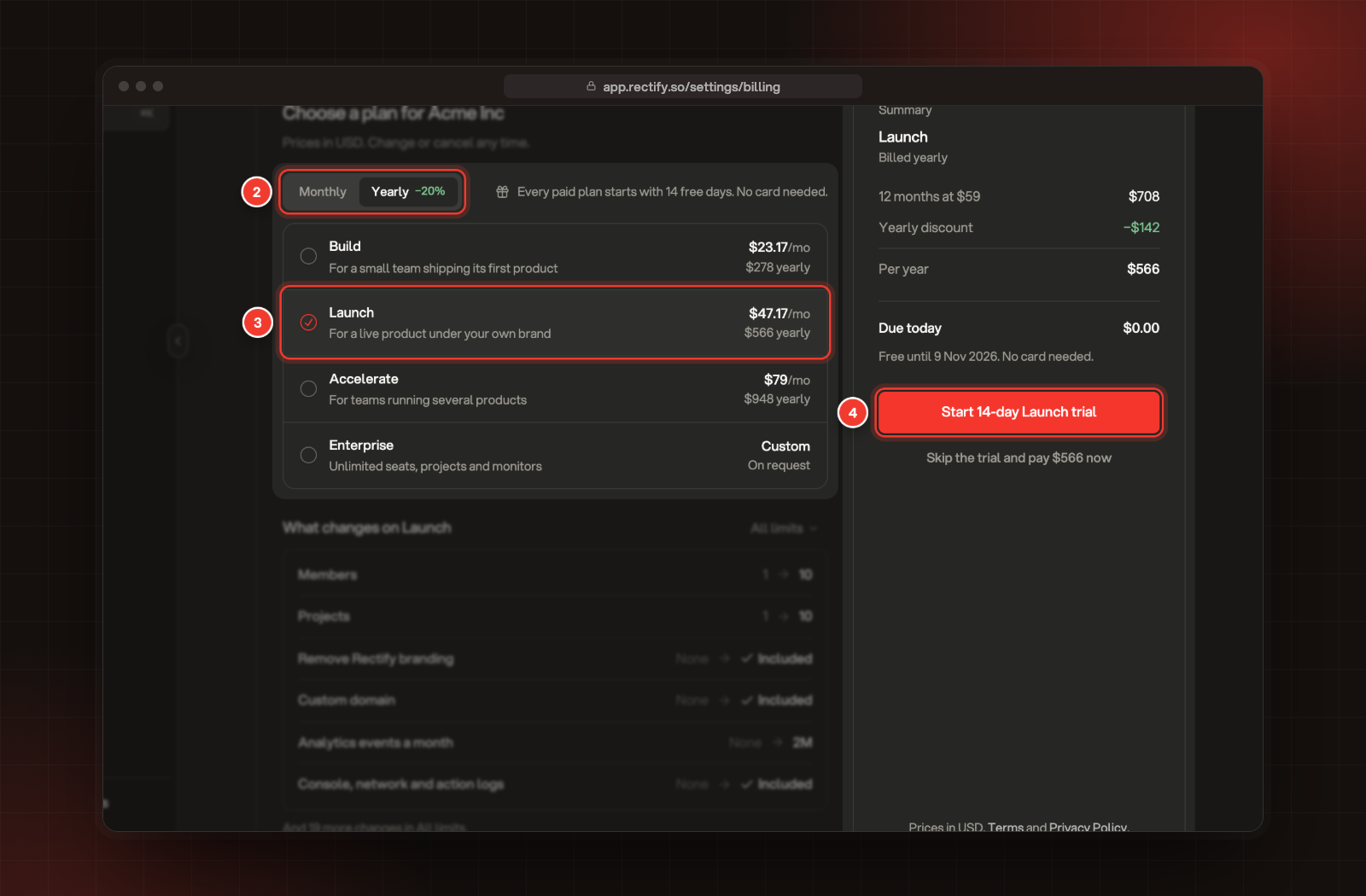
Start a free trial, upgrade, switch between monthly and yearly billing, or cancel, from the Billing page.
2 min readUpdated 5 days ago
Before you start. Only Owners and Admins can change the plan. A Member who opens an upgrade prompt can select Copy upgrade link and send it to one of them.
Start a trial or upgrade
1.
Open Organization settings, then Billing.
2.
Choose Monthly or Yearly. Yearly saves 20%.
3.
Pick a plan. What changes on the plan lists what you'll get, and All limits shows everything.
4.
Select the trial button, for example Start 14-day Launch trial. No card is needed.
2 Monthly or Yearly. 3 Pick a plan. 4 Start the trial.
To pay straight away instead, select Skip the trial and pay under the trial button. Checkout opens next, where you pay by card. Prices are in US dollars.
Upgrade prompts in the app, for example when you reach a limit, open the same plan picker.
Change your plan or billing on a paid plan
1.
Open Organization settings, then Billing.
2.
Under Change plan, select the pencil next to Plan or Billing interval, and pick the new one.
3.
Select Update subscription, then Update to confirm.
You're charged or credited the difference straight away.
To move to a smaller plan, you need to fit its limits first. If you have more members or projects than it allows, you'll see a message starting "Cannot downgrade". Remove members or projects, then try again.
Cancel your subscription
1.
Open Organization settings, then Billing.
2.
Select Cancel subscription.
3.
Type CANCEL to confirm, then select Cancel Subscription.
Your paid features stay on until the end of the billing period you've paid for. After that, your organization moves to the free Idea plan.
Changed your mind before then? On Billing, select Reactivate subscription, then Reactivate. Your plan carries on, and the next billing period is charged as usual. Once the subscription has ended, select Choose a plan on Billing to pick a plan again.
Enterprise
For unlimited seats, projects and monitors, pick Enterprise in the plan picker and select Contact sales.
I can't open Billing
Only Owners and Admins can see Billing. Ask one of them to change the plan for you.